Thank you for your patience while we retrieve your images.
Photography
▼
Photography
▼
Events
Portfolio
Travel
|
Family History
▼
Family History
▼
Published Family History
Family Photo Collections
Portraits of a Life
Home
»
Family Photo Collections
»
Portraits of a Life
Step 4: Edit, Enhance & Restore
Crop the Image
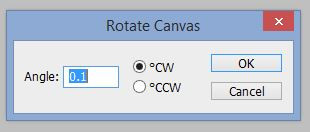
The Adobe Photoshop rotation screen that opens after selecting the
Image
menu, select
Image Rotation,
Arbitrary…
Copyright © 2022 by MB Boutiques, all rights reserved.